Every once in a while I need to extract the content of a .msi file in order to customize a deployment for a particular network environment. Sometimes initializing the .msi installer will temporarily extract the files into C:\Documents and Settings\<username>\Local Settings\Temp, but those files are removed once the installer exits.
To extract files from a .msi file at the command line, type:
msiexec /a PathToMSIFile /qb TARGETDIR=DirectoryToExtractTo
For example, to extract files from f:\zenworks\zfdagent.msi into c:\zfd701 you would type:
msiexec /a f:\zenworks\zfdagent.msi /qb TARGETDIR=c:\zfd701
The destination directory does not need to exist prior to running this command.
[update 05-20-2009]
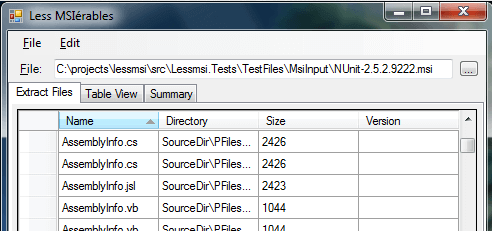
I have a new favorite MSI extraction tool called LessMSIerables. Check it out!
December 17, 2007 at 4:35 am
Thanks for the info on How to extract .msi file in windows xp. It was very helpful and plus i did not have to download another utility in order to do so.
February 29, 2008 at 10:21 am
Bah, doesn’t work with msi files that INSIST on installing crap for all users when you are not an administrator.
April 11, 2008 at 5:14 am
Very handy to know that. I needed to get a copy of RoboCopy out of the 2003 Resource Kit to use on a Windows 2000 machine. Did the job nicely for me.
August 27, 2008 at 5:39 am
Thanks for sharing this. I just need to clarify that it’s important to specify the full path to the destination directory in TARGETDIR property. If your path is not fully qualified then the msiexec tries to connect to the server which name will be equal to the name you’ve specified.
September 26, 2008 at 6:54 pm
It does NOT work on Wine 0.9.14, instead it shows tons of warnings and nothing happens….
May 17, 2009 at 8:12 pm
Of course it’s not going to work in Wine, it’s not Windows, and not all of the resources for completing command line operations are there. Try VirtualBox.
~Night
October 21, 2008 at 1:47 pm
I was tryning to extract Itune and it kept asking for administrator privilege. I think I found a way around the problem.
If I use first /ju switch. msiexec is in user mode
msiexec /ju PathToMSIFile TARGETDIR=DirectoryToExtractTo
Then I can use to extract the file
msiexec /a PathToMSIFile TARGETDIR=DirectoryToExtractTo
From the doc
/j [/t ] [/g ]
Advertises a product – m to all users, u to current user
November 25, 2008 at 10:08 pm
Brilliant korser! works like a charm. Thanks.
December 11, 2008 at 1:51 pm
I use Ubuntu Linux, and I’ve found that installing p7zip and running “7z x .msi” works well. (see http://www.7-zip.org). Others have had success with wine and “msiexec”.
Good luck,
/charles thayer
March 23, 2009 at 12:48 am
The next version of InstEd Plus (http://www.instedit.com/instedplus) will allow you to easily extract the files from an msi/msm into a source tree. Plus you get all the normal features of InstEd and InstEd Plus.
August 10, 2009 at 11:12 am
[...] quick Google search for “extracting msi files” revealed a really nice blog post Howto: extract files from a .msi file using the Windows command line . Go there and learn how to extract MSI files and then add them manually to a tools repository and [...]