
I was recently performing some performance testing that required me to copy many files of a particular size from one Windows workstation to a Windows file server. I had a heck of a time figuring out how to batch generate the test files.
Finally I came across the fsutil tool, which is included in all versions of Windows from Windows XP to Windows 10 and also in Windows Server editions. When using the command, make sure you are already in the directory where you want the files to be created.
Generate Test Files in Windows using fsutil
The syntax for using fsutil is:
fsutil file createnew filename filesize
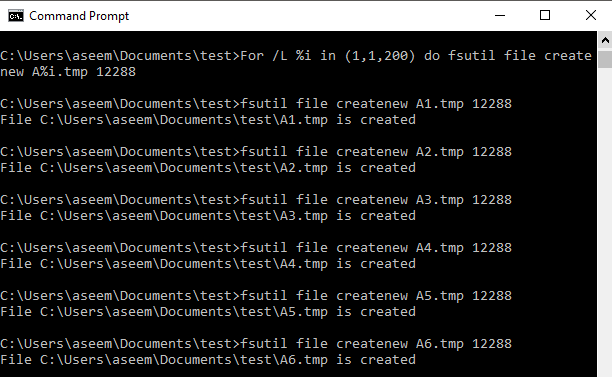
I used a simple loop to create files of a particular size using fsutil. Running from a command prompt:
For /L %i in (1,1,200) do fsutil file createnew A%i.tmp 12288
This command will create 200 files of size 12288 bytes (12KB) named A1.tmp, A2.tmp, A3,tmp, etc.
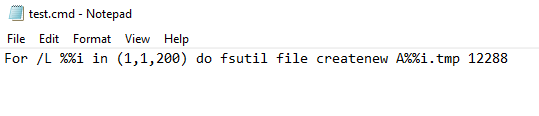
To run this loop in a .cmd file instead of from the command line replace, single % with double percent signs.
For /L %i in (1,1,10000) do fsutil file createnew B%i.tmp 65536
will create 10,000 files of 65536 bytes (64KB) named B1.tmp, B2.tmp, B3,tmp, etc.
For /L %i in (1,1,2500) do fsutil file createnew C%i.tmp 131072
will create 2,500 files of 131072 bytes (128KB) named C1.tmp, C2.tmp, C3,tmp, etc.
For /L %i in (1,1,1000) do fsutil file createnew D%i.tmp 1048576
will create 1,000 files of 1048576 bytes (1024KB or 1MB) named D1.tmp, D2.tmp, D3,tmp, etc.
I was able to create hundreds of thousands of files of a very specific size in a short amount of time using this procedure. It’s a pretty powerful utility and not that many people even know about it.