The clicking sound that Windows plays when you click on a link in Internet Explorer or open a folder in Windows Explorer can get annoying.
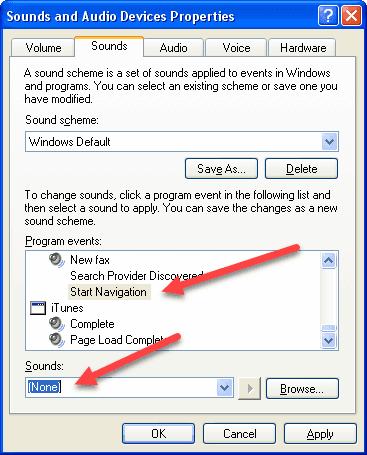
Here’s how to disable the sound in Windows XP:
- Click Start > Control Panel > Sounds and Audio Devices
- Click the Sounds tab
- Scroll down the list under Program Events. Under the Windows Explorer section, highlight Start Navigation.
- Under the Sounds box, select (None) > OK, close Control Panel
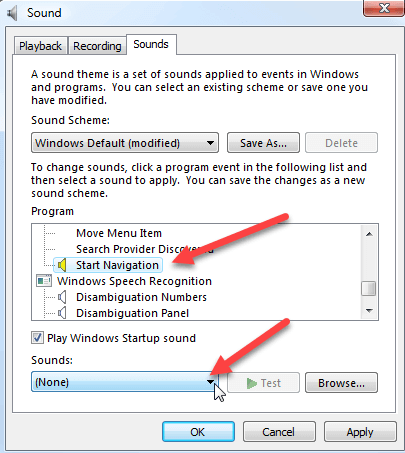
Here’s how to disable the sound in Windows Vista:
- Click Start > Control Panel > Sound
- Click the Sounds tab
- Scroll down the list under Program. Under the Windows Explorer section, highlight Start Navigation.
- Under the Sounds box, select (None) > OK, close Control Panel
You should no longer hear the clicking noise when you select links in Internet Explorer or open directories in Windows Explorer.
April 25, 2009 at 2:24 pm
Thanks! I have been muting my computer on and off for years whenever that dratted clicking noise got on my nerves. Now I don’t have to anymore.
May 3, 2009 at 4:52 am
Thank you. Now if I can just find a way that my websites can disable this default feature of Windows Explorer, I’ll be in business. Unfortunately, about two thirds of users are still using Explorer, which seems to like sabotaging the designers audio/visual design with these arbitrary clicks. It’s frustrating for both users and designers.
May 29, 2009 at 12:09 pm
Under the same screen, I selected no sounds for all of it…and poof, it worked! LOL, fixed my problem, not sure if it created another though.
June 14, 2009 at 2:59 pm
Here’s how to disable the Internet Explorer clicking sound in Windows 7.
http://capitalhead.com/articles/disable-click-sound-in-internet-explorer-(ie)-and-windows-7.aspx
August 12, 2009 at 12:52 pm
That has to be the most annoying sound. Why MS decided to continue this archaic sound through the few generations of IE is mystifying. It makes even the newer versions sound like an old, slow computer.
November 15, 2009 at 11:14 am
I can’t disable mine, I did the instructions and it reverts to the default again. And yes I did click apply.