
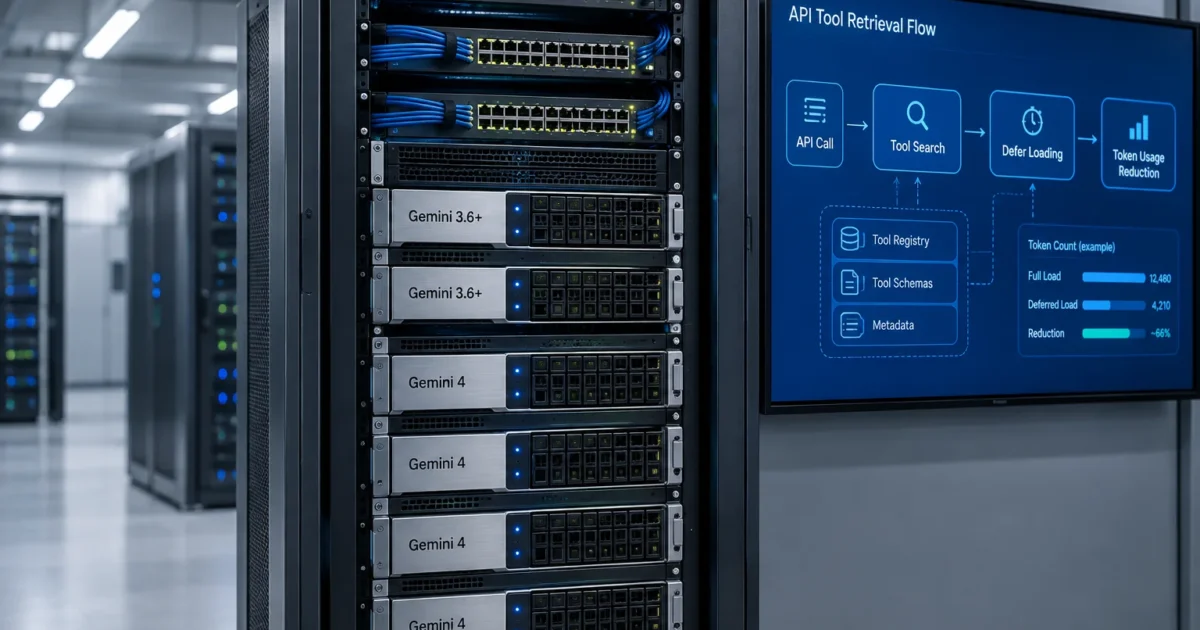
On November 19, 2026, Google launched Gemini API Tool Retrieval in preview in the Gemini Interactions API. It runs on Gemini 3.6 and later models, including all Gemini 4 models. Per Google’s November 19, 2026 post, Introducing Tool Retrieval in the Gemini API, and the Google AI Studio Gemini API Changelog (both retrieved November 19, 2026), the feature keeps full function schemas out of the first prompt. The model only loads a parameter schema when it asks for that tool by name.
If you run AI agents with dozens or hundreds of tools, this change addresses a nagging token overhead problem. Sending every nested JSON schema on every turn burns input tokens before the model reads one word of user text. The Gemini Interactions API splits short tool descriptions from heavy parameter schemas. Full schemas only enter the context when a turn actually uses them.
| Feature Component | Verified Specification (Nov 19, 2026 Preview) | Operational Impact |
|---|---|---|
| API Surface | Gemini Interactions API (Preview) | Needs requests sent through the Interactions API endpoints |
| Supported Models | Gemini 3.6 and later (including all Gemini 4 models) | Doesn’t work on pre-3.6 model versions |
| Search Declaration | {"type": "tool_search"} | Adds a fixed input-token block for on-demand schema loading |
| Deferral Flag | defer_loading: true (server-side retrieval only) | Keeps tool name and description in context while holding back parameter schemas |
| Remote MCP Support | Supported on mcp_server declarations | Defers full tool schemas from remote Model Context Protocol servers |
| Client-Side Lookup | “execution”: “client”(without defer_loading) | Routes schema lookup to client code across an extra application round trip |
| Token Behavior | Deferred schemas excluded from initial prompt | Keeps parameter schemas out until needed (standard token rates only; no separate feature charge) |
What Happened
Every function-calling model trades tool count against context overhead. In a traditional function-calling setup, you send the full JSON schema for every tool up front. Each schema holds parameter names, data types, enum lists, nested objects, and field notes. If your backend wires 80 internal scripts and ticket hooks into an agent, the model reads all 80 parameter trees on every turn.
On November 19, 2026, Google added a two-stage loading path in the Gemini Interactions API to break that pattern. You don’t need to send full schemas for every tool on every turn anymore. Instead, for server-side retrieval, you add a built-in {"type": "tool_search"} block and flag low-use tools with defer_loading: true.

When you set defer_loading to true with server-side tool_search, the Gemini Interactions API strips the parameter schema from the first prompt. The model still gets the name and top-level description of each deferred tool in its active window. That keeps routing grounded. The model reads those short names and descriptions to see which tools exist.
When a user prompt needs one of those deferred tools, Gemini runs the tool search step. It pulls that tool’s parameter schema by name. With default server-side execution, the Gemini Interactions API loads the full schema and finishes the function call in the same turn.
The November 19, 2026 update in the Google AI Studio Gemini API Changelog confirms that this preview also supports defer_loading on remote Model Context Protocol (MCP) server entries (mcp_server). Remote MCP servers often expose huge lists of database, monitoring, or repo actions. Setting defer_loading: true on an mcp_server entry stops a remote server from dumping its whole schema catalog into your token budget when you connect.
How Gemini API Tool Retrieval Works in the Interactions API
Will Gemini API Tool Retrieval actually lower your tool-related token usage? The answer depends on how you structure tool declarations and schema lookup in your requests.
Request Declarations and Deferred Schema Loading
Turning on server-side on-demand schema loading takes two edits in a Gemini Interactions API call for Gemini 3.6 or any Gemini 4 model. First, add the built-in server-side tool search block to your tool list:
{
  "type": "tool_search"
}
Second, set the boolean flag defer_loading to true on single tools or on a remote mcp_server block that you want the server to load on demand.
{
  "defer_loading": true
}
Applying defer_loading: true selectively gives you fine control over mixed server-side workloads. Say an ops agent uses three core health-check tools in 90 percent of chats, plus 120 niche diagnostic tools in the other 10 percent. You can apply defer_loading: true to the 120 niche tools so their full schemas only load when needed.
Server-Side Execution vs. Client-Side Lookup
Google’s November 19, 2026 preview gives you two distinct modes to load schemas once the model calls tool_search:
- Server-side retrieval: Pair
{"type": "tool_search"}withdefer_loading: trueon individual tool schemas or remotemcp_serverblocks. Google loads the requested schema on its servers, and the model gets the schema and fills in the function arguments in the same turn. - Client-side lookup (
“execution”: “client”
): If your team can’t hand a static list of every internal tool to Google up front, usetool_searchwith“execution”: “client”
and the client-side retrieval parameters and result flow, without settingdefer_loading:
{
  "type": "tool_search",
  "execution": "client"
}
Do not combine defer_loading: true with “execution”: “client”
. The defer_loading flag applies only to server-side retrieval, and using it without server-side tool_search including alongside “execution”: “client”
returns a 400 error.
With “execution”: “client”
enabled, Google documents a multi-step application round trip rather than automatic in-API lookup: the model emits a client search call (tool_search_call / client search tool call), your backend runs RBAC checks or queries an internal registry, your follow-up request returns the matched schemas (function_result / tool_search_result) keyed to previous_interaction_id, and the model then generates its final function_call.
Preserving Prompt Prefix Caching (and Tool List Limits)
Many custom tool routers rewrite the top of the prompt on every turn using an external index, breaking the cached prefix whenever tools shift.
Server-side Tool Retrieval preserves that initial prefix across turns by keeping deferred names and descriptions fixed at the front and appending newly loaded schemas later in the conversation. However, you still pass your tools declaration on each request (including chained interactions), and once a schema loads it stays in context—and bills as input—for the rest of the conversation rather than unloading.
Choosing Server-Side vs. Client-Side for Production Agents
Pick one mode per backend path rather than mixing configurations: use server-side tool_search plus defer_loading: true for static internal tool sets or remote mcp_server gateways, and use “execution”: “client”
without defer_loading when private registries or per-user permissions prevent declaring tools up front (keeping your local registry query fast to absorb the added round trip).
How It Stacks Up
To judge Gemini API Tool Retrieval, compare it against sending full tool schemas up front or filtering tools on the client. You can evaluate the retrieval modes by comparing how each approach handles initial prompt context, schema resolution, and token overhead.
| Evaluation Dimension | Up-Front Full Schema Loading | Server-Side Tool Retrieval ({"type": "tool_search"} + defer_loading: true) | Client-Side Tool Retrieval ({"type": "tool_search", "execution": "client"}) |
|---|---|---|---|
| Supported API & Models | Standard Gemini API models | Gemini Interactions API on Gemini 3.6+ and Gemini 4 (Preview) | Gemini Interactions API on Gemini 3.6+ and Gemini 4 (Preview) |
| Initial Prompt Context | Full name, description, and complete JSON parameter schema for all tools | Tool names and descriptions only for deferred tools, plus fixed tool_search block | Client tool_search declaration and search parameters (plus any non-deferred tools) |
| Schema Resolution Path | Already in context on turn 1 | Loaded by Google in the same turn when requested by name | Sent back to client code to query internal registries or run permission checks |
| Execution Path | Standard function-calling flow | Finished in the same turn on the server side | Adds an extra application round trip to client code before building the call |
| Initial Tool Declarations | Static full tool list sent on every turn | Declared up front with defer_loading: true | Resolved via client search parameters and result flow (defer_loading returns a 400 error) |
| Context Token Footprint | Every full schema consumes context tokens on every turn | Fixed tool_search overhead plus schemas loaded on demand | Fixed tool_search overhead plus schemas returned by client on demand |
| Migration & Admin Effort | None (baseline approach) | Low. Add {"type": "tool_search"} and set defer_loading: true on large tools or mcp_server blocks | Moderate. Build a client-side lookup and result handler (without defer_loading) |
Pricing and the Token Break-Even Calculation
Tool Retrieval carries no separate feature fee — input and output tokens are billed at the standard rates for the Gemini model you call, with loaded schemas continuing to count as input for the rest of the conversation. Weigh two context factors against your unloaded schemas:
- Base
tool_searchoverhead: Adding{"type": "tool_search"}puts a fixed block of input tokens into the request context. - On-demand schema loading: Whenever Gemini requests a tool through server-side or client-side search, its full parameter schema is loaded into context for that interaction.
That trade-off sets your break-even point. You only save tokens when the total tokens of the schemas that stay unloaded beat the tool_search overhead plus the schemas you actually load.
Consider two concrete workload shapes:
- Where Tool Retrieval wins: You run a DevOps bot or homelab controller wired to three remote
mcp_servergateways with 150 tools and deep JSON parameter trees. In a four-turn debug session, the user checks one service log and restarts one worker. That calls just 2 tools out of 150. Keeping 148 full schemas unloaded cuts most tool schema overhead, and the context only takes on thetool_searchblock and two loaded schemas. - Where Tool Retrieval loses: You run a small support bot with 5 tools, and the average chat calls 4 of them in the first two turns. Here, your context carries the fixed
tool_searchtoken block plus the full schemas for almost every tool anyway. If you use“execution”: “client”
, you also add an application round trip for client-side lookup requests with little net token reduction.
In server-side retrieval, initial tool picking relies only on a tool’s name and short description. That means your setup work includes auditing your tool docstrings. If two tools have vague or overlapping descriptions and used to rely on parameter names to tell them apart, the model won’t see those parameter names until after it picks a tool. You’ll need to write clear, sharp top-level descriptions for every tool marked with defer_loading: true.
The Reaction
Community feedback and user benchmarks on X, Reddit, and Hacker News are still forming after Google’s November 19, 2026 preview release. No verified public forum benchmark threads measuring real-world token reductions or retrieval latency were available at publication time.
Our Take
Verdict: Pilot on multi-tool and MCP-heavy agents, and skip on small tool lists. If your agent uses dozens of tools or connects Gemini 3.6 or Gemini 4 to large mcp_server catalogs where most tools sit idle, run a staging pilot now. A server-side test only takes adding {"type": "tool_search"} and defer_loading: true in the Gemini Interactions API. Using “execution”: “client”
(without defer_loading) for internal registry permission checks adds an extra application round trip and requires building the client lookup handler.
Keep this in staging for now, as the feature entered Preview on November 19, 2026. Hiding parameter schemas in server-side mode means initial tool picking relies only on tool names and descriptions. Run your test suite, log input tokens before and after turning on defer_loading: true, check tool-picking accuracy, and roll it out only where unloaded schemas beat the fixed tool_search cost.
Wrapping Up
Google’s November 19, 2026 Tool Retrieval preview gives Gemini 3.6 and Gemini 4 teams a clean way to cut context token overhead from unused tool schemas. Audit your largest tool lists and remote mcp_server blocks first. Focus defer_loading: true on your low-use tools and large catalogs during server-side staging tests, or use “execution”: “client”
when tools must be resolved from an internal registry.
| Step | Action | Applies To |
|---|---|---|
| 1. Check Model & API Scope | Target the Gemini Interactions API using Gemini 3.6 or any Gemini 4 model | Gemini Interactions API agent backends |
| 2. Choose a Retrieval Mode | Add {"type": "tool_search"} for server-side retrieval, or add “execution”: “client”for client-side registry lookup (adds an app round trip) | Multi-tool agents with dozens or hundreds of tools |
| 3. Configure Tool Loading | For server-side mode only, set defer_loading: true on low-use tools and mcp_server blocks (never combine with “execution”: “client”) | Server-side tool lists and large remote MCP catalogs |
| 4. Audit Descriptions & Measure | Tighten top-level tool descriptions and compare staging input token logs against baseline runs | Pre-production engineering pilots |